 Frogg
1063960540
Frogg
1063960540
|
||
|---|---|---|
| .gitignore | ||
| CHANGELOG.md | ||
| LICENSE | ||
| README.md | ||
| frogg_ssl_check.sh | ||
| zabbix_template_v4.4.xml | ||
| zabbix_template_v6.json | ||
| zabbix_template_v7.json | ||
README.md
Zabbix Template Module SSL version 1.0.0
Tested on Zabbix 7.0 Tested on Zabbix 6.0 Tested on Zabbix 4.4
Introduction
Template for Zabbix to check SSL expiration using external script. It can check:
- days left until expire
- if SSL certificate can be read
Requirement
The script use the commands openssl so it requires the Linux package openssl
To install it you can use the package manager of your distribution
Exemple
apt-get install openssl
By the way you may require sudoer rights to run the command.
Installation
Content
The template installation require 2 files:
- frogg_ssl_check.sh Zabbix external script
- frogg_ssl_check.json Zabbix template configuration
External script
You need to place the script frogg_ssl_check.sh into zabbix external forlder externalscripts/frogg_ssl_check (by default in /usr/lib/zabbix/externalscripts/frogg_ssl_check)
You can find the external script folder in Zabbix configuration file zabbix_server.conf (by default in /etc/zabbix/zabbix_server.conf)
You will need to add execute permission on the script
chmod +x frogg_ssl_check.sh
Testing the installation
You can run the command:
- To Test SSL certificate
./frogg_ssl_check.sh -a=exist -s=frogg.fr -p=443
- To get day left of ssl certificate
./frogg_ssl_check.sh -a=expire -s=frogg.fr -p=443
Template
Then you need to import the frogg_ssl_check.xml template configuration file in the Zabbix web interface in Template tab using the import button
Host configuration
The template use 5 macros :
| MACRO | Description | Default |
|---|---|---|
| {$SSL.DNS} | web server DNS name | |
| {$SSL.PORT} | server web ssl port | port 443 |
| {$SSL.INFO} | number of days left before triggering information | 60 days |
| {$SSL.WARN} | number of days left before triggering warning | 30 days |
| {$SSL.AVG} | number of days left before triggering average | 10 days |
Template items

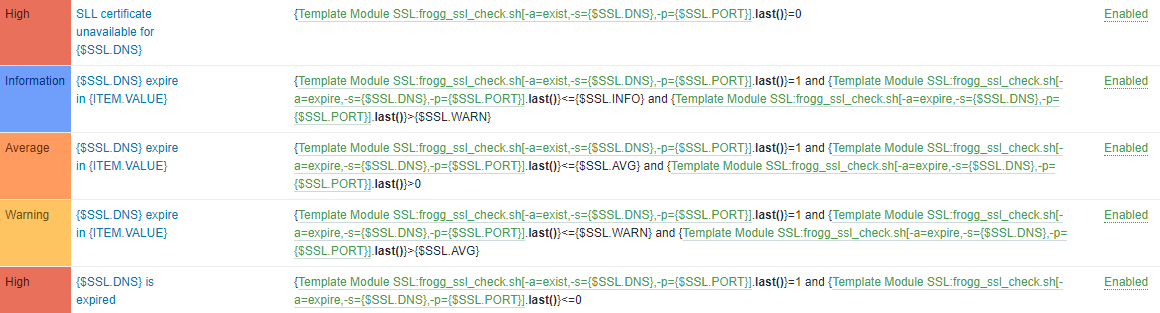
Template triggers
Debugging
Going further...This step is working with most of the externals scripts
If you got troubles getting an external script working, first :
- Check the Zabbix tab Monitoring > lastest data If you select a host, you should see all items linked to it, check for your item, and you should see the lasted data linked to it. If it appears in gray (disabled) that mean there is something wrong with the external script (rights, path, arguments ...) To find more about it, you can check logs
- By default, the logs are in /var/log/zabbix/zabbix_server.log, or you can find the log path in Zabbix configuration file zabbix_server.conf (by default /etc/zabbix/zabbix_server.conf)
To get the last log lines you can use for example:
tail -f /var/log/zabbix/zabbix_server.log
Then look at the script trouble...
Example:
 In this case Zabbix cannot find the path of the script as you can see no such file or directory